Sell DTF transfers by size, right on your product page.
Customers upload their art, pick a placement and garment size, and check out. You get an auto-packed, print-ready gang sheet, priced by the square inch.
 Find us on Shopify
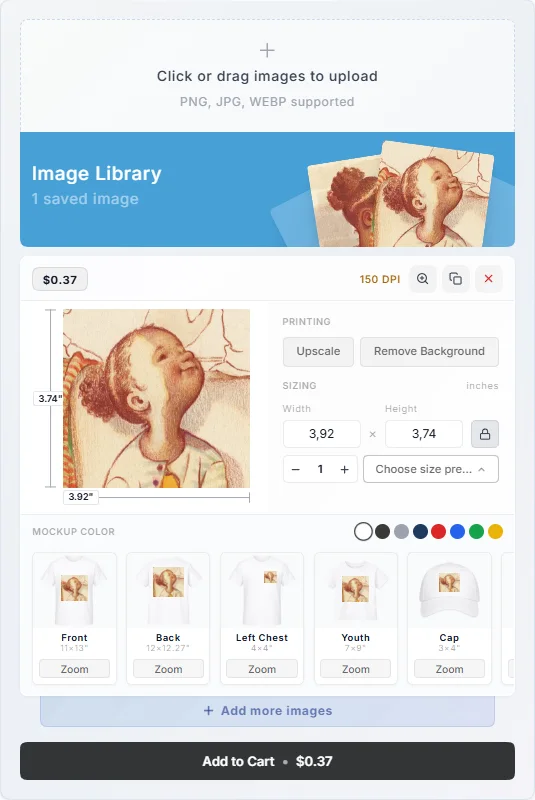
From upload to print-ready in three steps.
Customer uploads their design
PNG, JPG, or WebP, dropped straight onto your product page. Background removal and AI upscaling are one click away.
Picks a placement and size
Front, back, left chest, youth, cap, tote, or apron, each with real garment size presets. A live DPI badge flags low-res art before it becomes a reprint.
You get a print-ready file
Orders are packed automatically onto your gang sheets, stamped with the order number, and delivered as a high-res PNG. Download and print.
Built for shops that sell transfers like garments.
Size presets that match real garments
No abstract dimensions. Customers pick the placement they actually print, and every preset maps to proven garment sizing.
- True-to-garment sizing, from left chest up to full front and back
- Back, left chest, youth, cap, tote bag, and apron presets included
- Per-image quantity: customers order exactly what they need
Priced by the square inch
Set your rate once and every size prices itself. Customers see the exact cost for their selection before it hits the cart. No quote emails, no spreadsheets.
- Configurable per-square-inch rate for your shop
- Live price updates as customers change size and quantity
- Priced at checkout by Shopify Functions: no variants, nothing to pre-build
Image processing built in
The same processing pipeline as our Gang Sheet Builder, so customer files arrive print-ready instead of "we'll fix it later".
- One-click background removal at full resolution
- AI upscaling rescues low-resolution artwork
- Live DPI check: green at 300+ DPI, flagged below
Orders that pack themselves
Every incoming order is nested onto your sheets with bin-packing optimization. Less film wasted, nothing arranged by hand.
- Automatic gang sheet packing on your roll width
- Order number stamped on every rendered sheet
- Print-ready PNG download on every line item
For customers who think in shirts, not sheets.
Garment decorators, team-wear shops, and small brands usually know exactly what they want: twenty left-chest logos and fifteen full backs. Asking them to arrange a 22-inch canvas is friction they did not come for, and it is where many of them abandon a gang sheet page.
Transfer by Size lets them buy custom DTF transfers the way they buy garments: choose a placement, upload the art, set a quantity. The app does the sheet layout after checkout, packing every transfer in the order onto your roll width, so you still print efficient gang sheets while the customer never sees one.
Customers who do want to lay out their own sheet are better served by the gang sheet builder, and print professionals who arrive with a finished file by Upload Gang Sheet. All three run in the same app.
How a transfer’s price is calculated.
You set one rate per square inch of printed area. Each transfer’s price is its width times its height times that rate, multiplied by the quantity. An illustration with an example rate of $0.04 per square inch (your rate is your own):
| Transfer | Area | Price each |
|---|---|---|
| 4 × 4 in | 16 sq in | $0.64 |
| 10 × 12 in | 120 sq in | $4.80 |
| 12 × 14 in | 168 sq in | $6.72 |
Not sure what rate to set? Work out your cost per square inch with the gang sheet calculator, then read how much to charge for DTF gang sheets. For common transfer and sheet dimensions, see the DTF gang sheet size guide.
Frequently Asked Questions
Everything you need to know about Transfer by Size. Something missing? Ask us directly.
What file formats can customers upload?
How is the transfer price calculated?
What do I receive when an order comes in?
Will it clutter my store with products and variants?
Which placements and products are covered?
Can I run Transfer by Size and the gang sheet builder in the same store?
Start selling transfers by size today.
Install Transfer by Size, enable the upload block on a product page, and take your first order in minutes.